claude-simple-stats-bar
Claude Simple Stats Bar (VS Code)




Claude Code has no built-in status bar for session stats - this extension fills that gap, showing model, tokens, context left, and cost live in VS Code.

Minimal by default. Turn on showModel and showSeverityTag for the model name and the severity tag:

Features
- A status bar segment shows total tokens, context used, and estimated cost - model name and severity tag are opt-in. It updates live as you chat.
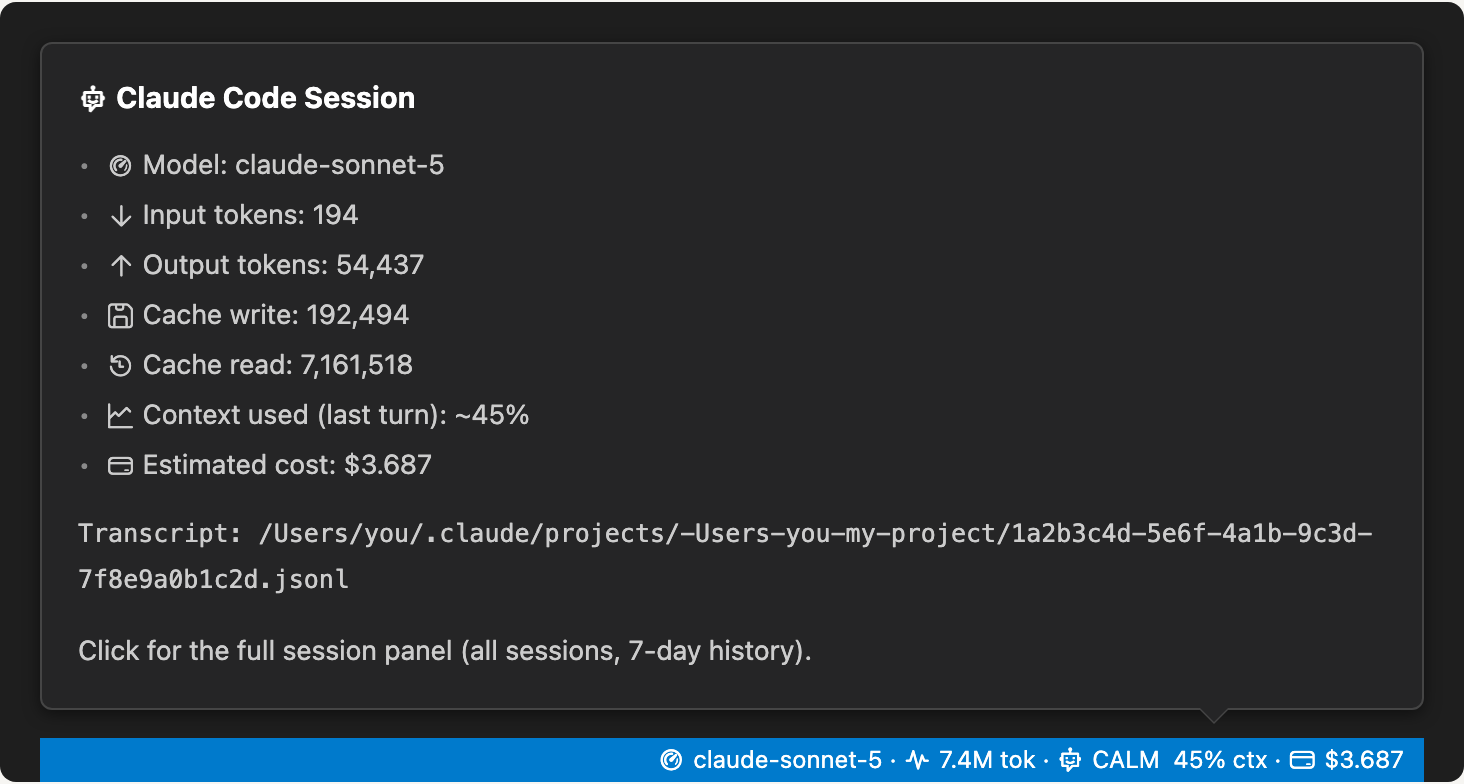
- Hover the segment for a full token breakdown and the transcript path.
- Click the segment for a session panel listing every session in the workspace, a 7-day spend chart, and spend by model.
- Pricing and poll interval are both configurable.
Where the data comes from
There’s no public API for Claude Code session telemetry. This extension reads the same .jsonl transcript files Claude Code already writes to disk, under ~/.claude/projects/<workspace-path-with-slashes-replaced-by-dashes>/<session-id>.jsonl. It scans every folder in a (possibly multi-root) workspace for a matching directory and picks the most recently modified file as primary, re-parsing it on file changes plus a periodic poll as a fallback.
Requirements
- VS Code 1.90 or newer.
- The Claude Code CLI, writing transcripts locally under
~/.claude/projects/. This extension has no other data source.
Claude segment
Context % is just your last message, not the whole session. It tells you if your next message will fit, not how much you’ve used so far. The optional severity tag colors that percentage: CALM under 50%, MED 50-69%, WARN 70-89%, CRIT 90% or higher.
Hover the segment for a per-category token breakdown and the transcript path:
Session panel
Click the segment, or run Claude Simple Stats Bar: Open Session Panel:
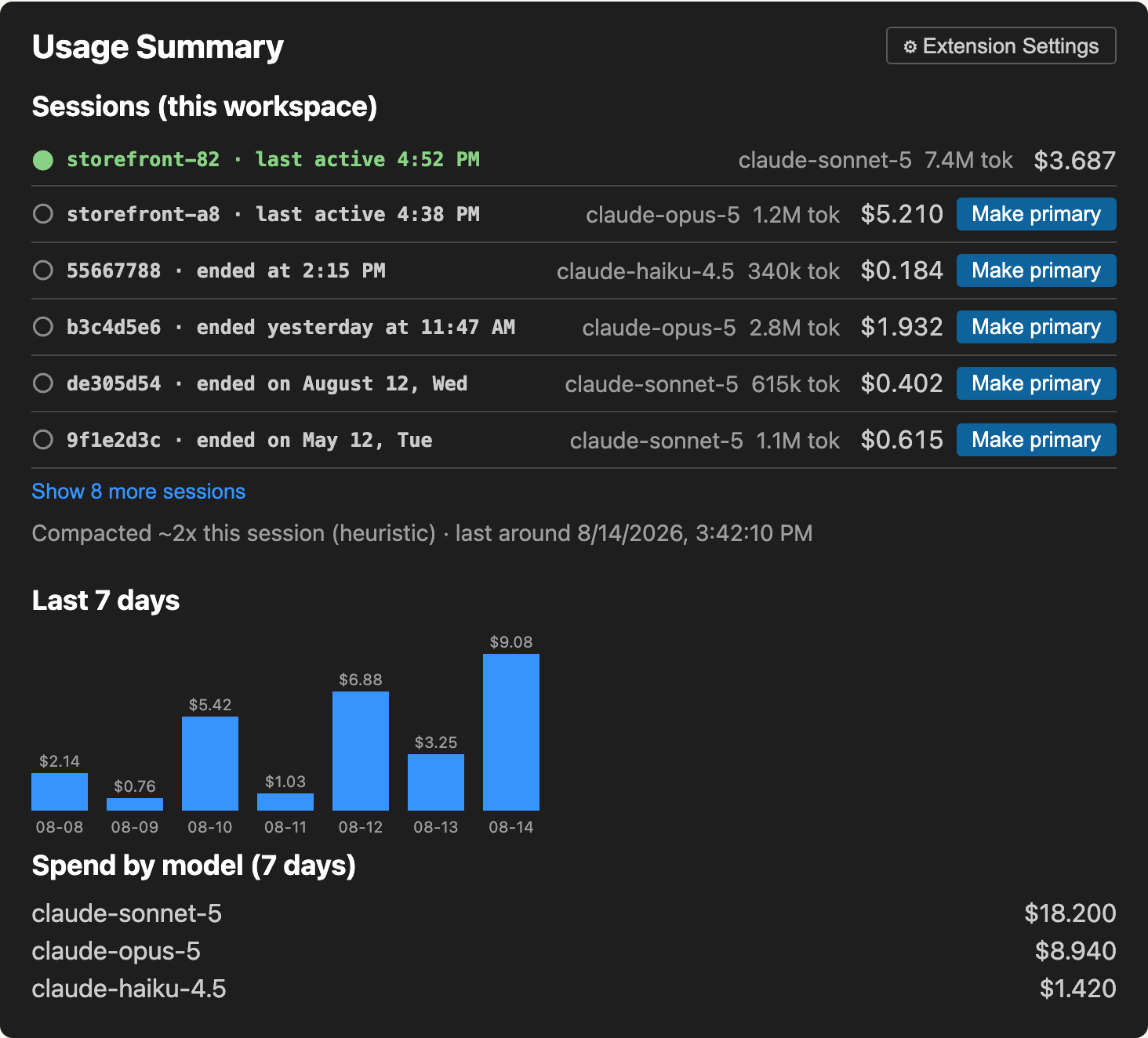
- Sessions in this workspace - every transcript found here, with the primary one marked. Each row shows a timestamp to tell sessions apart:
last active <time>for a still-running session, or a scaledended <time>for one that’s finished. Only the 6 most recent show by default - click Show more sessions to reveal the rest. With more than one session running, use Make primary, or the Switch Primary Session command, to pick which one shows in the status bar - the pick persists across VS Code restarts. - Last 7 days - a spend chart and per-model breakdown, stored locally and pruned past 7 days.
- Compaction - a count of likely compaction events.
Settings
| Setting | Default | What it does |
|---|---|---|
claudeSimpleStatsBar.pollIntervalMs |
2000 |
How often to re-check the transcript file. |
claudeSimpleStatsBar.contextWindowTokens |
0 |
Override the model’s context window size. 0 auto-detects. |
claudeSimpleStatsBar.showContextBar |
false |
Show the 6-segment fill bar next to the context-usage tag. |
claudeSimpleStatsBar.showModel |
false |
Show the model name in the status bar. |
claudeSimpleStatsBar.showSeverityTag |
false |
Show the CALM/MED/WARN/CRIT severity tag next to the context %. |
claudeSimpleStatsBar.pricing |
{} |
Per-model USD rates per 1M tokens. See Cost estimates. |
Commands
| Command | What it does |
|---|---|
Claude Simple Stats Bar: Refresh |
Force a re-read of the current transcript. |
Claude Simple Stats Bar: Open Session Panel |
Open the webview panel (also bound to clicking the Claude segment). |
Claude Simple Stats Bar: Switch Primary Session |
Pick which concurrent session in this workspace is tracked as primary. |
Cost estimates
Built-in USD rates ship for the current Sonnet/Opus/Haiku/Fable lineup (as of 2026-08), so cost shows without any setup. Anthropic’s pricing changes over time - verify current rates before relying on this for anything beyond a rough estimate. Override a model’s rate, or add one that isn’t built in, via claudeSimpleStatsBar.pricing:
{
  "claudeSimpleStatsBar.pricing": {
    "claude-sonnet-5": {
      "inputPerMillion": 3,
      "outputPerMillion": 15,
      "cacheWritePerMillion": 3.75,
      "cacheReadPerMillion": 0.3
    }
  }
}
Models with neither a built-in default nor a configured entry show cost as n/a.
Build from source
git clone https://github.com/rcanpahali/claude-simple-stats-bar.git
cd claude-simple-stats-bar
npm install && npm run package
code --install-extension claude-simple-stats-bar-*.vsix
Re-run npm run package after code changes and reinstall, or press F5 to launch an Extension Development Host without installing anything.
Changelog
See CHANGELOG.md.

